360 Stitching
The 360° pano looks like one seamless photograph of the horizon. It isn't — it's six ordinary flat photos taken 60° apart and stitched into a strip, and how they are stitched decides whether that strip can be trusted as a compass. For years the pipeline simply pasted the six photos side by side (the naive stitch): it looked perfect, and it quietly mis-placed every mountain by up to 1.4°, which is why bearings drifted and PeakFinder's peaks never sat on the terrain. The fix — bending each photo onto a cylinder before pasting — changed no dimensions, no file size, and nothing the eye can see, which is exactly why it looked like nothing changed at all.
This page explains the difference from the ground up: a plain-words primer, an animation of the world wrapping onto a cylinder, a stitching machine you can run both ways, and the measured evidence — everything built on two real captures from boucher-cam07 (Axis Q6075-E, 2026-08-26): a naive stitch at 17:57:52 UTC and a cylindrical stitch at 18:05:32 UTC, both embedded at full resolution so every claim can be checked against the pixels.
The objection
"The degree and image pixel is exactly the same before the fix and after the fix." — the entirely reasonable reaction to two files with identical dimensions
This is a fair objection, and half of it is simply true. Everything that genuinely did not change:
- Dimensions:
11520 × 1080in both files. - Six frames, one per 1920 px slot, pan slots 60° apart — same capture plan in both.
- Average scale:
11520 / 360 = 32.000 px/°— exact, in both. - At the six frame centers the two panos agree column-for-column (measured: +1 px at az 150.0°, −3 px at az 30.0° — the noise floor).
- At arm's length they look like the same picture.
So "32 px/° before and after" is correct — as an average. The fix is about the claim hiding inside it: 32 px/° everywhere. The old stitch delivers that on exactly six columns of the image. Everywhere else it is off by up to 44 px, and the error has a specific, predictable shape.
The whole idea, in plain words
Three everyday pictures carry the entire concept. (Dotted-underlined terms on this page explain themselves when you click them.)
Picture 1 — the panorama is a lampshade. Stand in the camera tower. The world wraps all the way around you, like the inside of a round lampshade. The pano strip is that lampshade cut open and laid flat. Its one promise: every column of pixels is one compass direction, spaced perfectly evenly — 32 columns per degree, no exceptions.
Picture 2 — a photo is flat glass. A camera photo isn't curved — it's the world traced onto a flat pane of glass. At the center of the pane, flat and curved agree almost exactly. Toward the edges, the flat pane stretches the scene: the same 1° of world gets painted wider and wider.
Picture 3 — you already know this problem. It's the map-of-the-Earth problem. Force a curved thing onto a flat surface and the edges distort — that's why Greenland looks giant on a classroom map. Our camera does the same trick sideways, six times per spin.
The old pipeline taped six flat window-panes together and called the result a lampshade. The new pipeline bends each pane around the curve first, then tapes them. Same glass, same pixels — but now each pixel actually sits at the compass direction the ruler claims.
Here is that idea moving — the six real frames wrapping onto the ring the way the world actually curves around the tower, and then the ring being cut open into the strip:
The lampshade from the primer, animated with the real capture. Press play to wrap the six flat photos onto the ring.
Watch it happen
The machine below is a toy model of the real pipeline — a camera that spins, shoots flat photos, and builds a strip both ways. One honest exaggeration so your eyes can see what the math sees: the toy camera's photos cover 75° each instead of the real 60.81°, which makes the stretching and the overlap about 18× more visible. Then flip to real pano mode: the same four stages run on the six actual frames cut live from the embedded naive capture, with a native-resolution loupe on the az 60° seam — the only place the true-scale error concentrates enough to see.
Six flat photos, two ways to make a lampshade out of them. Press play — or jump to any stage, and flip to real pano mode to run the same machine on the actual capture.
Try it on real pixels
The toy exaggerates. This doesn't. Below is one actual frame from the naive pano — the slot spanning azimuth 0°–60°, exactly as the old pipeline pasted it, untouched. The bend is a ±44 px correction hiding in an 11520 px image: invisible to the eye, fatal to a bearing. At 100% with the ghost on, the bent flat frame lands on the real cylindrical capture (taken 7 min 40 s later — expect lighting drift and a small vertical offset from the unleveled mount, but the terrain sits at the same columns).
The geometry
The pano strip makes a promise every consumer relies on: column x sits at azimuth
az₀ + x/32. Linear. That's what the on-screen degree readout, click-to-aim, and the
PeakFinder mapping all compute.
But each 1920 px frame is a
.
A pinhole places content that is θ degrees off the lens axis at x = f·tan θ from the frame
center — read that as "multiply the lens number f by the flat-glass stretch factor tan θ to
get pixels from center" — with
for this camera's 60.81° field of view. tan θ is not a straight line. The two rules agree
at θ = 0 — the frame center — and nowhere else:
| off-axis angle θ | pinhole delivers f·tan θ | strip promises 32 px/° · θ | error | in degrees |
|---|---|---|---|---|
| 0° (frame center) | 0 px | 0 px | 0 px | 0° |
| 15° | 438.5 px | 480 px | 41.5 px | 1.30° |
| 20° (worst) | 595.6 px | 640 px | 44.4 px | 1.39° |
| 25° | 763.1 px | 800 px | 36.9 px | 1.15° |
| 30° (slot edge) | 944.8 px | 960 px | 15.2 px | 0.48° |
The old pano is an unrolled hexagon sold as an unrolled cylinder. Pasting six flat frames side by side is geometrically identical to projecting the world onto six tangent planes and flattening them out. The planes touch the true cylinder only at the tangent points — the frame centers — which is exactly why the error is zero there and grows in between. The cylindrical stitch resamples each frame onto the arc first, so unrolling it is honest.
The shape of the error: a sawtooth
Subtract the promise from the delivery and you get f·tan θ − 32θ, repeating every 60° slot.
Because we have a naive and a cylindrical pano of the same terrain 7 min 40 s apart, we don't
have to trust the formula: the horizontal offset between them was measured every 4°
across the 0–60° frame, by
gradient windows of the same terrain:
Placement error of the naive stitch across one 60° frame
boucher-cam07, 2026-08-26, 17:57:52 vs 18:05:32 UTC · line = predicted f·tanθ − 32θ · dots = measured naive-vs-cylindrical offset, az 2°–58° · faded = weak correlation
…and it repeats six times around the circle
same curve unrolled over the full 360° pano · dashed verticals = seams · dots = the six exact columns
Exhibit A: same compass window, two different answers
The same pixel window — columns 6912–7424, azimuth 36°–52° by the strip's own contract — cut from each pano, with a line drawn at the same column in both: azimuth 48.4°, which is 18.4° past the frame center — near the top of the sawtooth. Watch the mast leg with the blue clamp:
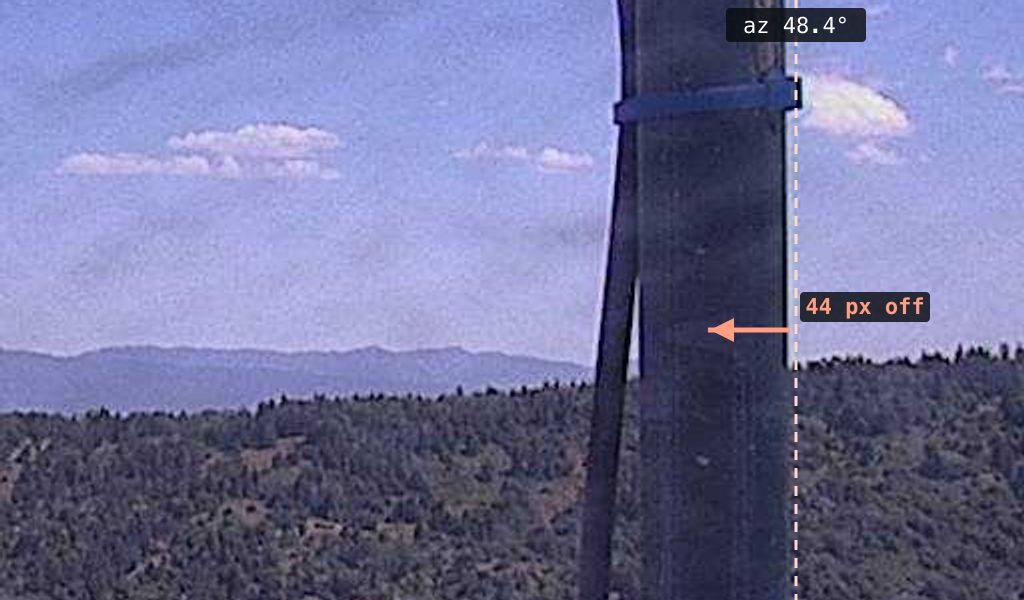
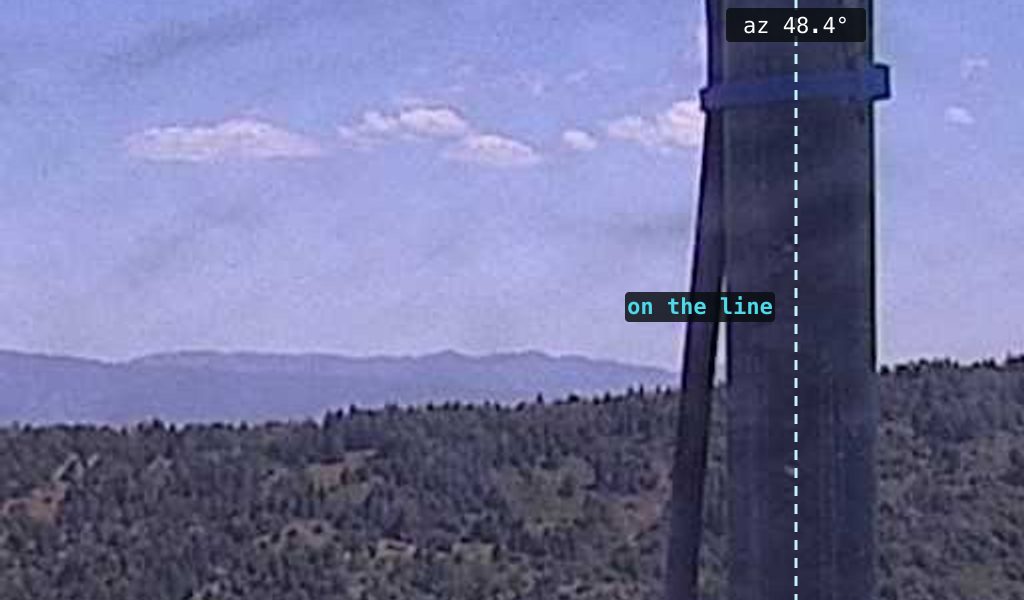
The mast is 44 px (1.4°) from where the strip says it is. In the cylindrical pano the mast leg sits on the 48.4° line; in the naive pano the same mast sits 44 px toward the frame center — measured 44, predicted 44.4. A consumer converting that column to a bearing gets an answer 1.4° off.
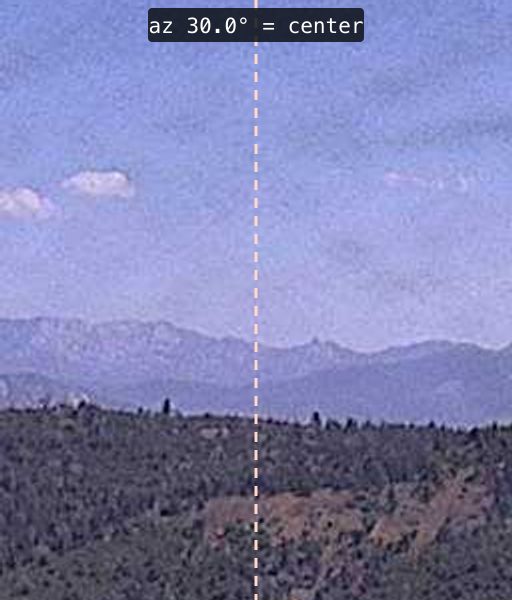
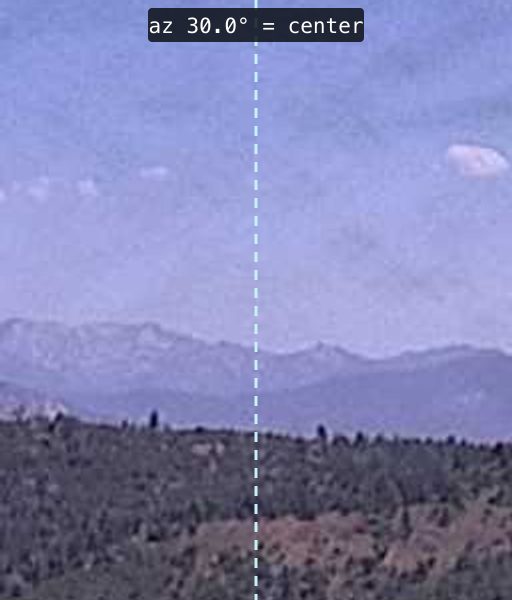
Control: at the frame center, the objection is 100% right. Same test at azimuth 30.0° — a frame center, the tangent point. Measured offset there: −3 px — the noise floor. This is precisely why spot-checking a landmark near mid-frame "confirms" nothing changed.
Exhibit B: project a true compass onto each image
The real compass — computed from the camera geometry, 2° per zebra cell — projected onto each pano. On the cylindrical stitch the cells are a constant 64 px. On the naive stitch the same degrees breathe: 57 px per 2° near frame centers, 76 px per 2° at slot edges. Both average exactly 64; only one is 64 everywhere.


Same viewport (az 305°–55°), same terrain, true degree ticks. Follow any labeled degree from the ruler down to the landscape: mid-frame the two versions disagree by up to ~1.4° about which mountain a degree points at.
The full panos, scrollable


frame centers (panos agree): az 210° · 270° · 330° · 30° · 90° · 150° seams (naive tears & double-prints): az 240° · 300° · 0° · 60° · 120° worst mid-frame error: ~±20° from any center. To measure an offset yourself: untick linked scrolling, slide one strip until the same feature sits under both hairlines, and read Δ.
Exhibit C: at the seams, terrain breaks
By the slot edge the placement error is ±15 px — and it points in opposite directions on the two sides of a seam, so the naive stitch tears terrain at every 1920 px boundary:
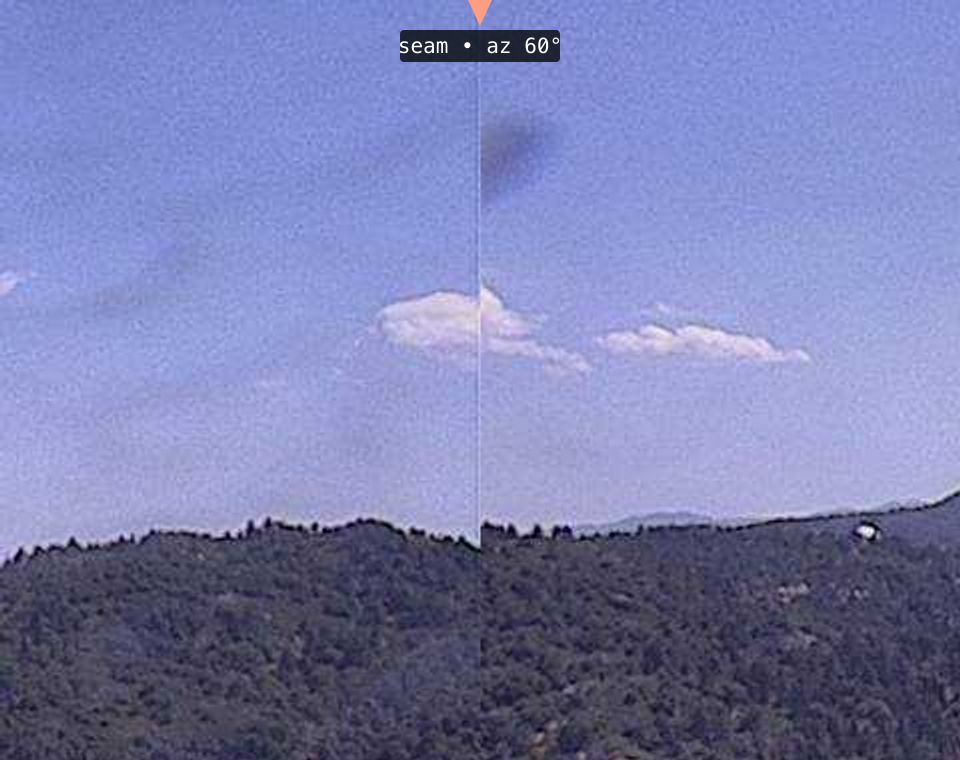
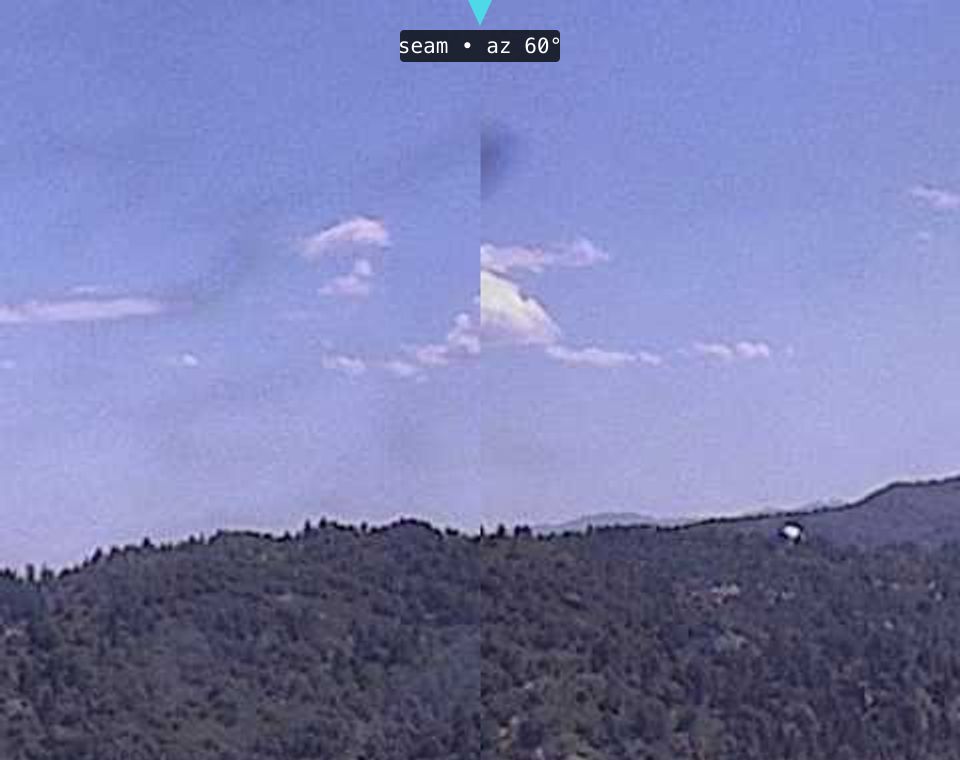
Left: the ridgeline steps sideways and the cloud is cut mid-air. Right: the terrain continues at the correct columns. Two honest notes: the cylindrical stitch still shows an exposure edge (adjacent frames are separate exposures seconds apart), and this capture also shows a small vertical step at the seam — the unleveled-mount residual (≤ ~1°, same as the old stitch) that the separate leveling work addresses. The fix on this page is the horizontal degree contract.
Exhibit D: 0.81° of the world is printed twice at every seam
Two facts: each frame spans 60.81° of world, and the naive stitch pastes each frame into
a 60.00° slot. Nothing is cropped. So 60.81° − 60.00° = 0.81° of world at every seam
exists in both neighboring frames and is printed twice — once at the right edge of one
slot, again at the left edge of the next. Six seams: the naive canvas holds ~364.9° of world
on a 360° strip.
Measured, not just derived — the signature of an overlap is that content on both sides of a seam is displaced away from it. Displacement of seam-adjacent content at all five interior seams (px; + is rightward; naive = 18:00:33 UTC, position ruler = the 18:05:32 cylindrical capture):
| seam | naive, 1.25° left | naive, 1.25° right | naive jump | cylindrical jump |
|---|---|---|---|---|
| az 240° (x 1920) | −19 | +26 | 45 | 2 |
| az 300° (x 3840) | −24 | +24 | 48 | −1 |
| az 0° (x 5760) | −25 | +25 | 50 | −1 |
| az 60° (x 7680) | −26 | +23 | 49 | −2 |
| az 120° (x 9600) | −19 | +24 | 43 | 0 |
Geometry predicts a 45 px jump at ±1.25° from each seam if 0.81° is double-printed, and 0 if nothing is. The sign pattern matters: left-side content pushed left, right-side content pushed right means the band in between is drawn on both sides — a double print, not a gap. (The az 120° seam is dominated by the tower a few meters away; near-field parallax makes its numbers approximate.)
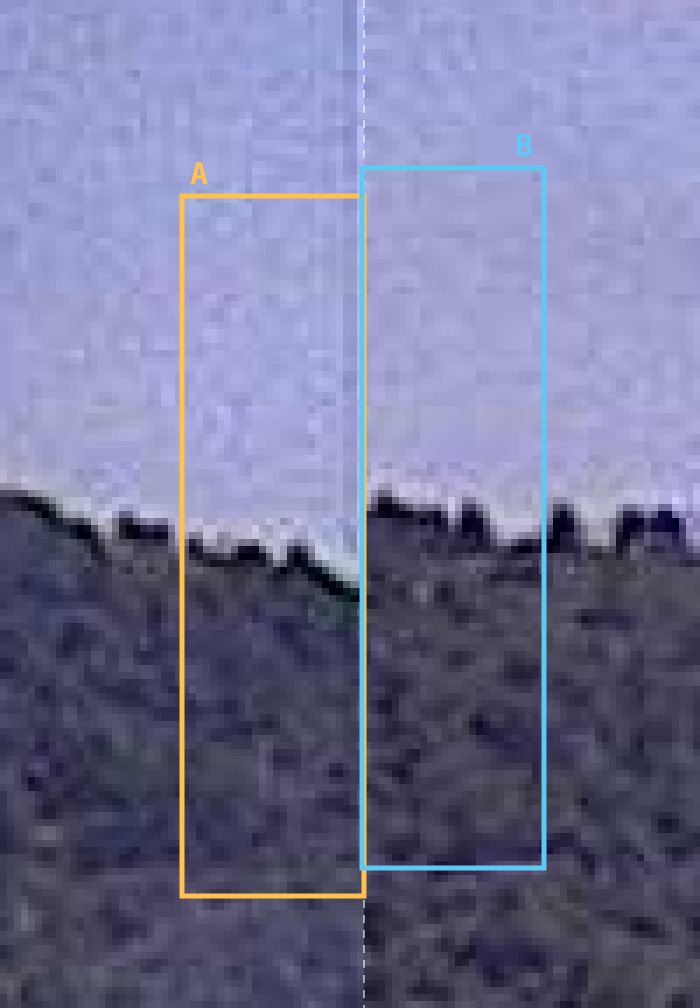
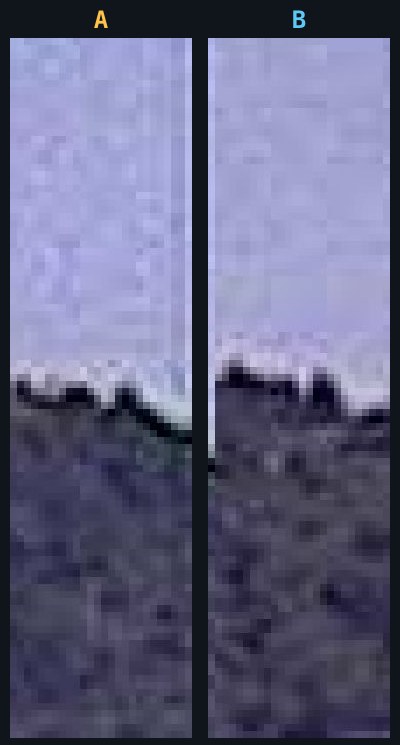
Box A (left of the seam) and box B (right of it) are the same trees. Same white-backed treeline, same bumpy skyline, printed ~25 px apart. Operationally: a smoke plume rising near a seam exists twice in the naive pano, at two different bearings.
Also: the vertical axis
The same argument applies vertically. For the strip's geometry to be self-consistent at
32 px/°, rows must follow y = f_c·tan(alt) with f_c = 11520/2π = 1833.5 px. The raw
frames print vertical offsets at f = 1636.4 px — about 11% too small. A summit 5° above
the horizon sits ~17 px too low in the naive pano, and the miss grows with altitude.
Why PeakFinder could never line up on the old pano
This connects straight to the complaint that motivated the fix: PeakFinder's peaks refusing to sit on the pano's mountains (see Aligning PeakFinder to a Photograph for the full alignment model). PeakFinder renders its terrain on a mathematically perfect cylinder — in its cylindrical mode, bearing maps to screen position exactly linearly. It is the strip contract, implemented as software. Overlaying it on the old pano meant asking a straight ruler to agree with a sawtooth: no shift, scale, or boresight tweak can make them fit. Calibrate at a frame center and peaks toward the seams miss by up to 1.4° (44 px); calibrate at a seam and mid-frame misses instead. Every alignment attempt only chose where the error lived — which is why the tuning never converged. And the 0.81° overlap adds one more insult: near every seam the old pano holds two printed copies of a summit while PeakFinder draws exactly one outline at the contract column — landing between the copies, pointing at neither.
The demo below makes it concrete. The cyan line is the skyline traced from the cylindrical capture at the contract columns — a faithful stand-in for what any cylinder-true renderer draws at these bearings, with summit pins carrying their contract bearings. The amber dashed line is the same tracer run on the old capture. Vertical offset between the captures is compensated (that part was always calibratable); what remains is pure horizontal disagreement — the sawtooth, drawn by the mountains themselves.
Who consumes the degrees
Nothing on this page matters if the pano is only ever looked at. It matters because code converts pixels to bearings and back, everywhere, assuming the 32 px/° contract: the on-screen azimuth readout under the cursor · click-to-aim PTZ targeting · the PeakFinder overlay · cross-camera triangulation of a smoke bearing. Every one of them inherits the sawtooth from the old stitch:
| number | meaning |
|---|---|
| 1.4° | max bearing error mid-frame — every frame, both directions |
| ~0.5 mi | ground error from 1.4° when triangulating a smoke bearing at 20 mi |
| 6 × 0.8° | of the horizon printed twice — two bearings for one plume near a seam |
| 0 px | error after the fix, at every column — the contract the pixels now keep |
A fire spotted 20 miles out, bearing taken mid-frame: the line on the map starts half a mile sideways. Cross two such bearings from two cameras and the intersection can wander by miles. The fix costs nothing visible — same file, same size, same look — which is exactly why it looks like nothing changed.